Q: Does putting my computer to sleep help extend the battery life? What else can I do to save energy and make my new computer last?
A: We’ve all heard stories about what's best for a computer’s battery. That’s why I was excited to make friends with Fred Peters, president of Huntington Beach IT Services.
In addition to teaching computing courses in Orange County, Calif., Peters happily makes house calls to revive frazzled computers and the people who rely on them.
Here are his expert tips on how to keep your new laptop running smoothly.
Sunday, November 6, 2011
Monday, October 17, 2011
Cyber Threats Forecast for 2012
The year ahead will feature new and increasingly sophisticated means to capture and exploit user data, as well as escalating battles over the control of online information that threatens to compromise content and erode public trust and privacy. Those were the findings announced by the Georgia Tech Information Security Center (GTISC) and the Georgia Tech Research Institute (GTRI) in today's release of the Georgia Tech Emerging Cyber Threats Report for 2012. The report was released at the annual Georgia Tech Cyber Security Summit, a gathering of industry and academic leaders who have distinguished themselves in the field of cyber security.

Sunday, October 16, 2011
Speed Up Your Windows XP
Pursue Some tricks we can make our Windows more faster that never happen before and usually these all are unnecessary for each time. Some features are usually for only looking attractive.
Optimizing Display Settings
Windows XP mostly like for its visual interface. We do not interfere that but on this visualization has more extra feature that does not need ever without wasting system resource. Lets see how we can disable it-
1. Go to Start Menu
2. Click Setting.
3. Click Control Panel
4. Click System.
5. Go Advance Tab
6. Click Setting under Performance group
7. Off only the following ticked
* Show Shadows under Menu
* Show Shadows under Mouse Pointer.
* Show Translucent Selection Rectangle
* Use drop shadows for icons labels on desktop.
* Use visual style on windows and buttons
OPTIMISE YOUR PAGEFILE
If you give your pagefile a fixed size it saves the operating system from needing to resize the page file.
1. Right click on My Computer and select Properties
2. Select the Advanced tab
3. Under Performance choose the Settings button
4. Select the Advanced tab again and under Virtual Memory select Change
5. Highlight the drive containing your page file and make the initial Size of the file the same as the Maximum Size of the file. Windows XP sizes the page file to about 1.5X the amount of actual physical memory by default. While this is good for systems with smaller amounts of memory (under 512MB) it is unlikely that a typical XP desktop system will ever need 1.5 X 512MB or more of virtual memory. If you have less than 512MB of memory, leave the page file at its default size. If you have 512MB or more, change the ratio to 1:1 page file size to physical memory size.
REMOVE THE DESKTOP PICTURE
Your desktop background consumes a fair amount of memory and can slow the loading time of your system. Removing it will improve performance.
1. Right click on Desktop and select Properties
2. Select the Desktop tab
3. In the Background window select None
4. Click Ok
REMOVE FONTS FOR SPEED
Fonts, especially TrueType fonts, use quite a bit of system resources. For optimal performance, trim your fonts down to just those that you need to use on a daily basis and fonts that applications may require.
1. Open Control Panel
2. Open Fonts folder
3. Move fonts you don’t need to a temporary directory (e.g. C:\FONTBKUP?) just in case you need or want to bring a few of them back. The more fonts you uninstall, the more system resources you will gain.

1. Go to Start Menu
2. Click Setting.
3. Click Control Panel
4. Click System.
5. Go Advance Tab
6. Click Setting under Performance group
7. Off only the following ticked
* Show Shadows under Menu
* Show Shadows under Mouse Pointer.
* Show Translucent Selection Rectangle
* Use drop shadows for icons labels on desktop.
* Use visual style on windows and buttons
OPTIMISE YOUR PAGEFILE
If you give your pagefile a fixed size it saves the operating system from needing to resize the page file.
1. Right click on My Computer and select Properties
2. Select the Advanced tab
3. Under Performance choose the Settings button
4. Select the Advanced tab again and under Virtual Memory select Change
5. Highlight the drive containing your page file and make the initial Size of the file the same as the Maximum Size of the file. Windows XP sizes the page file to about 1.5X the amount of actual physical memory by default. While this is good for systems with smaller amounts of memory (under 512MB) it is unlikely that a typical XP desktop system will ever need 1.5 X 512MB or more of virtual memory. If you have less than 512MB of memory, leave the page file at its default size. If you have 512MB or more, change the ratio to 1:1 page file size to physical memory size.
REMOVE THE DESKTOP PICTURE
Your desktop background consumes a fair amount of memory and can slow the loading time of your system. Removing it will improve performance.
1. Right click on Desktop and select Properties
2. Select the Desktop tab
3. In the Background window select None
4. Click Ok
REMOVE FONTS FOR SPEED
Fonts, especially TrueType fonts, use quite a bit of system resources. For optimal performance, trim your fonts down to just those that you need to use on a daily basis and fonts that applications may require.
1. Open Control Panel
2. Open Fonts folder
3. Move fonts you don’t need to a temporary directory (e.g. C:\FONTBKUP?) just in case you need or want to bring a few of them back. The more fonts you uninstall, the more system resources you will gain.
Wednesday, October 12, 2011
SA Symantec Intelligence Report
Johannesburg - Symantec on Tuesday announced the results of the September 2011 Symantec Intelligence Report, which saw phishing attacks in South Africa increase once again.
 The country is now positioned as the most targeted geography for phishing, with one in 133.1 emails.
This month’s analysis also reveals that a deluge of malicious email-borne malware has left a clear mark on the threat landscape for September. Approximately 72 percent of all email-borne malware in September could be characterised as aggressive strains of generic polymorphic malware, first identified in the July Symantec Intelligence Report. At the end of July, this rate was 23.7 percent, in August it fell slightly to 18.5 percent before soaring to 72 percent in September.
“This unprecedented high-water mark underlines the nature by which cyber criminals have escalated their assault on businesses in 2011, fully exploiting the weaknesses of more traditional security countermeasures,” said Paul Wood, Senior Intelligence Analyst, Symantec.cloud.
Further analysis reveals that the social engineering behind many of these attacks has accelerated with the adoption of a variety of new techniques, such as pretending to be an email from a smart printer/scanner being forwarded by a colleague in the same organisation has been detected.
“The idea of an office printer sending malware is an unlikely one, as printers and scanners were not actually used in these attacks, but perhaps this sense of security is all that is required for such a socially engineered attack to succeed in the future,” Wood said.
Although spam levels remained fairly stable during September, Symantec Intelligence observed the use of identified vulnerabilities in certain older versions of the popular WordPress blogging software on a large number of web sites across the internet. Spam emails containing links to these compromised web sites are being spammed out. It is however important to note that blogs hosted by WordPress itself seem to be unaffected.
Additional research reveals that JavaScript is becoming increasing popular as the programming language used by spammers and malware authors. Spammers use it to conceal where they are redirecting pages, and in some cases, to conceal entire web pages.
“For spammers, hosting simple JavaScript obfuscation pages on free hosting sites can increase the lifetime of that site before the site operator realises the page is being used for malicious activity,” Wood said. “JavaScript is popularly used for redirecting visitors of a compromised web site to the spammer's landing page. While some of these techniques have been common in malware distribution for some time, spammers are increasingly using them.”
Originally posted on iol scitech

This month’s analysis also reveals that a deluge of malicious email-borne malware has left a clear mark on the threat landscape for September. Approximately 72 percent of all email-borne malware in September could be characterised as aggressive strains of generic polymorphic malware, first identified in the July Symantec Intelligence Report. At the end of July, this rate was 23.7 percent, in August it fell slightly to 18.5 percent before soaring to 72 percent in September.
“This unprecedented high-water mark underlines the nature by which cyber criminals have escalated their assault on businesses in 2011, fully exploiting the weaknesses of more traditional security countermeasures,” said Paul Wood, Senior Intelligence Analyst, Symantec.cloud.
Further analysis reveals that the social engineering behind many of these attacks has accelerated with the adoption of a variety of new techniques, such as pretending to be an email from a smart printer/scanner being forwarded by a colleague in the same organisation has been detected.
“The idea of an office printer sending malware is an unlikely one, as printers and scanners were not actually used in these attacks, but perhaps this sense of security is all that is required for such a socially engineered attack to succeed in the future,” Wood said.
Although spam levels remained fairly stable during September, Symantec Intelligence observed the use of identified vulnerabilities in certain older versions of the popular WordPress blogging software on a large number of web sites across the internet. Spam emails containing links to these compromised web sites are being spammed out. It is however important to note that blogs hosted by WordPress itself seem to be unaffected.
Additional research reveals that JavaScript is becoming increasing popular as the programming language used by spammers and malware authors. Spammers use it to conceal where they are redirecting pages, and in some cases, to conceal entire web pages.
“For spammers, hosting simple JavaScript obfuscation pages on free hosting sites can increase the lifetime of that site before the site operator realises the page is being used for malicious activity,” Wood said. “JavaScript is popularly used for redirecting visitors of a compromised web site to the spammer's landing page. While some of these techniques have been common in malware distribution for some time, spammers are increasingly using them.”
Originally posted on iol scitech
Monday, September 19, 2011
Make Your Computer Energy Efficient
I know that my computer has energy-efficiency settings. Yours does, too. But I almost never mess with them.
For some reason, for a lot of us, messing with the settings is one of those things you hear about, and know about, but put off to take care of “later,” when you find yourself at the computer with “some free time.”
But let’s be honest—your free time at your computer (and mine!) is a lot more likely to be devoted to trolling gossip sites and Facebook than to fine-tuning your computer’s energy settings. So let’s take a minute and change that today.
Here’s some very simple advice—some of which you can put into action right now, while you read this entry. You’ll save energy going forward, and you’ll assuage that guilty conscience by finally taking some easy little steps toward a more efficient home or office.
* Hibernation: With winter dragging on and on, doesn’t hibernation sound so appealing right now? Well, your computer feels the same way. Allow it to take nice little naps during the day when you wander away on coffee breaks, lunch breaks, talk-to-your-coworkers-in-the-hallway breaks, or whatever it is you do when you’re not doing what you’re supposed to be doing. Ok, first, go into your computer’s power management panel… Seriously, do this right now! Now, set the display and the hard drive to both go to sleep after 10 minutes or less of inactivity. Next, make sure the entire system is set to go into standby/sleep mode within 20-30 minutes. The lower you can keep the numbers in these settings, the better. That was so easy, right?
* Screen saver = energy waster: Can you believe it? Well, it’s true! Screen savers are a leftover idea from the early days of picture tube monitors, completely unnecessary for today’s monitors. They actually use a lot more energy than simply setting your monitor to dim itself before going to sleep would. So ditch the scrolling photos of frogs and blades of grass for some truly green action: Set your monitor to dim after 5 minutes or less of inactivity.
* Dim your watts: The brightest setting on your monitor causes it to gobble up twice as much energy as the dimmest setting. Save those wasted watts by keeping the monitor running on a much dimmer setter all the time. As the daylight changes wherever you’re using your computer, adjust the brightness.
* Strip smarter: Need we have the power strip conversation again? So, you know that it’s a good idea to plug electronics into a power strip to avoid that phantom load we’ve talked about before. This is an especially good idea when it comes to your computer, which tends to hang out with a lot of power-hungry friends like printers and speakers. The best solution of all is to get a smart plug strip, which will automatically cut the power flow when your computer and its posse aren’t in use. Automatic is good, because it’s one less thing for you to remember!
* Hibernation: With winter dragging on and on, doesn’t hibernation sound so appealing right now? Well, your computer feels the same way. Allow it to take nice little naps during the day when you wander away on coffee breaks, lunch breaks, talk-to-your-coworkers-in-the-hallway breaks, or whatever it is you do when you’re not doing what you’re supposed to be doing. Ok, first, go into your computer’s power management panel… Seriously, do this right now! Now, set the display and the hard drive to both go to sleep after 10 minutes or less of inactivity. Next, make sure the entire system is set to go into standby/sleep mode within 20-30 minutes. The lower you can keep the numbers in these settings, the better. That was so easy, right?
* Screen saver = energy waster: Can you believe it? Well, it’s true! Screen savers are a leftover idea from the early days of picture tube monitors, completely unnecessary for today’s monitors. They actually use a lot more energy than simply setting your monitor to dim itself before going to sleep would. So ditch the scrolling photos of frogs and blades of grass for some truly green action: Set your monitor to dim after 5 minutes or less of inactivity.
* Dim your watts: The brightest setting on your monitor causes it to gobble up twice as much energy as the dimmest setting. Save those wasted watts by keeping the monitor running on a much dimmer setter all the time. As the daylight changes wherever you’re using your computer, adjust the brightness.
* Strip smarter: Need we have the power strip conversation again? So, you know that it’s a good idea to plug electronics into a power strip to avoid that phantom load we’ve talked about before. This is an especially good idea when it comes to your computer, which tends to hang out with a lot of power-hungry friends like printers and speakers. The best solution of all is to get a smart plug strip, which will automatically cut the power flow when your computer and its posse aren’t in use. Automatic is good, because it’s one less thing for you to remember!
Wednesday, August 31, 2011
BioPDF PDF Writer
As downloaded, BioPDF PDF Writer is free for personal use. No matter which version you opt for, opt for one. Bullzip and BioPDF PDF Writer are in a class of their own when it comes to ease of installation, ease of use, and features. Another big plus--no nags or ads.
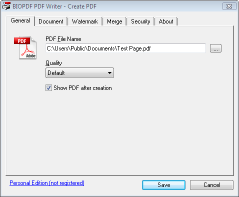
For admins, bioPDF is simple and flexible to adapt and deploy, with support for unattended setup scripts, Citrix Metaframe, and more. End-users find the PDF writer fast and intuitive to use, emboldened by the fact that the interface is localized into multiple languages. This leads to swift adoption and low support requirements. When all users can and do print to PDF, fewer potentially harmful or unreadable file formats are distributed and paper use is greatly reduced throughout the organization.
How Does it Work?
The bioPDF PDF Writer works as a Microsoft Windows printer and allows you to write PDF documents from virtually any Microsoft Windows application.
Feature Overview
- Print to PDF from almost any Windows application.
- Supports 64-bit operatings systems.
- Direct output to the same file each time or prompt for destination.
- Control if the printer should ask if you want to see the resulting PDF document.
- Control settings and prompts programmatically.
- Setup can run unattended.
- Graphical user interface.
- Password protect PDF documents.
- 128/40 bit encryption.
- Quality settings (screen, printer, ebook, prepress).
- Set document properties.
- Watermark text, size, rotation, and transparency.
- Superimpose/background documents.
- Appending/prepending documents.
- User interface control.
- Command line interface to all settings.
- COM/ActiveX API interface for programmatic control.
- Microsoft.NET API and command line API.
- Support for Citrix MetaFrame
- Support for Windows Terminal Server
- Create BMP, EPS, PS, PNG, PCX, JPEG, and TIFF files as alternative to PDF documents.
- Create linearized PDF files for optimized web viewing.
- Initial zoom settings.
- Page thumbnails.
- Create one PDF for all pages or one file per page.
- Individual horizontal and vertical resolution for image creation.
- Configure text and graphics alpha bits to support smooth edges in images.
Saturday, August 13, 2011
How safe are our Windows PCs from malware?
What percentage of PCs in the United States are infected with malware? If you’ve been following the mainstream press recently, you might have read an alarming statistic: “Nearly half of personal computers in the U.S. are compromised by malware.”
That statement is an outright fabrication. It is not true. It is not even remotely accurate, based on objective data. The actual number varies, depending on where you are in the world, but for Windows users who have automatic updates turned on, the worldwide average is somewhere between 1% and 2%. In my opinion, if you practice the basics of online security, the likelihood that your Windows PC is infected by malware is a tiny fraction of 1%.
And yet that alarming and bogus 50% number was stated as if it were a fact in a feature story last week at CNNMoney.com. That story has so far been recommended by 371 people on Facebook. The same “fact” was repeated in a variety of other online sources, including thestreet.com, CNBC.com, businessweek.com, businessinsider.com, and boston.com, to name just a few.
It hit my radar when I saw the number quoted in a tweet from Mark Russinovich, a Technical Fellow at Microsoft and one of the smartest people I know.
My first reaction was “Oh really?”
My second reaction was to do some research. It took me less than 15 minutes to knock down this story, which is just the latest example of a depressing truism: If you give the mainstream press a computer story, you can usually count on them to get it wrong. If you give them a sexy press release with a provocative number, you can cinch the deal.
This case starts with a press release from Staples, dated April 5, 2011. Here’s the part that sucked in that CNN staff writer:
A common misconception uncovered in the IT IQ survey is that we falsely presume our computers are well-protected from the viruses, spyware, and other malware that put our personal information at risk and decrease performance. 83 percent of the survey respondents stated that they are somewhat or very confident their computer is free of malware. Yet, nearly half of personal computers in the U.S. are compromised by malware.*
That asterisk was in the original. It leads to this footnote at the bottom of the press release:
*According to findings released by PandaLabs in February 2011.
There’s no link to that study, but it took only seconds to find the original report from Panda Security:
According to data gathered by the free online antivirus Panda ActiveScan, 50 percent of scanned computers were infected with malware, mostly Trojans.
So, the sample consists of people from around the world who were suspicious that their computers were infected and went to an online virus scanner? That’s a far cry from “nearly half of all computers in the U.S.” (Amusingly, a commenter on the Panda blog points out that the sample is “highly flawed,” and a response from Panda Security acknowledges that fact: “The data are taken from our online scanner ActiveScan. … Some people may think that the result is biased because some of those users suspect that they could be infected, which in fact is true.”)
Update 19-Apr: In response to this post, a spokeperson for Panda Security just contacted me. The company has edited the misleading headline on the press release to more accurately reflect its contents. The original headline read “In January, 50 percent of computers worldwide were infected with some type of computer threat.” The revised headline reads: “In January, 50 percent of computers scanned by Panda ActiveScan worldwide were infected with some type of computer threat.”
So why does Panda want to publish such an alarming and yet admittedly incorrect number? Because they’re trying to scare the crap out of you so they can sell antivirus software. Why does Staples want so spread that frightening but bogus statistic? Because they’re trying to scare the crap out of you so they can sell their EasyTech services. The original press release isn’t even subtle about it: “Our certified EasyTech associates are highly trained with expertise in diagnostics, repair, virus/malware removal and data back up solutions to name a few.”
The best numbers I’ve seen from an independent source (i.e., one that isn’t trying to sell a security product) are in Microsoft’s annual Security Intelligence Report. The Malware Trends section of the most recent report contains telemetry data drawn from more than 600 million Windows computers worldwide by a number of different Microsoft security tools and services, including the Malicious Software Removal Tool (which is included with automatic Windows updates every month), the free Microsoft Security Essentials and Windows Defender programs, and Microsoft’s enterprise security software.
According to the most recent data, covering a one-year period that ended in mid-2010, the five worst locations in the world (in terms of active malware infections that had to be cleaned) were Turkey, Spain, Korea, Taiwan, and Brazil. The infection rates for those regions varied from quarter to quarter, but they ranged from 30 to 60 infections per 1000 computers—worldwide, the number is roughly 10 infections cleaned per 1000 PCs. That’s about 1% on average, and about 6% in the worst cases. Update: Although the MSRT doesn’t remove every species of malware, it covers every widespread family—more than 150 in all—so I expect its figures to be representative of general infection rates.
If you use Windows and you have automatic updates turned on, you’re in that sample. If you’re even moderately cautious about how you use the Internet, your risk of infection is probably well below the midpoint of that sample.
Obviously, the rate of malware infection is unknown (and probably considerably higher) for people who refuse to update their computers. But those people are unlikely to pay a tech at Staples to clean up their PC.
Originally Posted on ZDNET
That statement is an outright fabrication. It is not true. It is not even remotely accurate, based on objective data. The actual number varies, depending on where you are in the world, but for Windows users who have automatic updates turned on, the worldwide average is somewhere between 1% and 2%. In my opinion, if you practice the basics of online security, the likelihood that your Windows PC is infected by malware is a tiny fraction of 1%.
And yet that alarming and bogus 50% number was stated as if it were a fact in a feature story last week at CNNMoney.com. That story has so far been recommended by 371 people on Facebook. The same “fact” was repeated in a variety of other online sources, including thestreet.com, CNBC.com, businessweek.com, businessinsider.com, and boston.com, to name just a few.
It hit my radar when I saw the number quoted in a tweet from Mark Russinovich, a Technical Fellow at Microsoft and one of the smartest people I know.
My first reaction was “Oh really?”
My second reaction was to do some research. It took me less than 15 minutes to knock down this story, which is just the latest example of a depressing truism: If you give the mainstream press a computer story, you can usually count on them to get it wrong. If you give them a sexy press release with a provocative number, you can cinch the deal.
This case starts with a press release from Staples, dated April 5, 2011. Here’s the part that sucked in that CNN staff writer:
A common misconception uncovered in the IT IQ survey is that we falsely presume our computers are well-protected from the viruses, spyware, and other malware that put our personal information at risk and decrease performance. 83 percent of the survey respondents stated that they are somewhat or very confident their computer is free of malware. Yet, nearly half of personal computers in the U.S. are compromised by malware.*
That asterisk was in the original. It leads to this footnote at the bottom of the press release:
*According to findings released by PandaLabs in February 2011.
There’s no link to that study, but it took only seconds to find the original report from Panda Security:
According to data gathered by the free online antivirus Panda ActiveScan, 50 percent of scanned computers were infected with malware, mostly Trojans.
So, the sample consists of people from around the world who were suspicious that their computers were infected and went to an online virus scanner? That’s a far cry from “nearly half of all computers in the U.S.” (Amusingly, a commenter on the Panda blog points out that the sample is “highly flawed,” and a response from Panda Security acknowledges that fact: “The data are taken from our online scanner ActiveScan. … Some people may think that the result is biased because some of those users suspect that they could be infected, which in fact is true.”)
Update 19-Apr: In response to this post, a spokeperson for Panda Security just contacted me. The company has edited the misleading headline on the press release to more accurately reflect its contents. The original headline read “In January, 50 percent of computers worldwide were infected with some type of computer threat.” The revised headline reads: “In January, 50 percent of computers scanned by Panda ActiveScan worldwide were infected with some type of computer threat.”
So why does Panda want to publish such an alarming and yet admittedly incorrect number? Because they’re trying to scare the crap out of you so they can sell antivirus software. Why does Staples want so spread that frightening but bogus statistic? Because they’re trying to scare the crap out of you so they can sell their EasyTech services. The original press release isn’t even subtle about it: “Our certified EasyTech associates are highly trained with expertise in diagnostics, repair, virus/malware removal and data back up solutions to name a few.”
The best numbers I’ve seen from an independent source (i.e., one that isn’t trying to sell a security product) are in Microsoft’s annual Security Intelligence Report. The Malware Trends section of the most recent report contains telemetry data drawn from more than 600 million Windows computers worldwide by a number of different Microsoft security tools and services, including the Malicious Software Removal Tool (which is included with automatic Windows updates every month), the free Microsoft Security Essentials and Windows Defender programs, and Microsoft’s enterprise security software.
According to the most recent data, covering a one-year period that ended in mid-2010, the five worst locations in the world (in terms of active malware infections that had to be cleaned) were Turkey, Spain, Korea, Taiwan, and Brazil. The infection rates for those regions varied from quarter to quarter, but they ranged from 30 to 60 infections per 1000 computers—worldwide, the number is roughly 10 infections cleaned per 1000 PCs. That’s about 1% on average, and about 6% in the worst cases. Update: Although the MSRT doesn’t remove every species of malware, it covers every widespread family—more than 150 in all—so I expect its figures to be representative of general infection rates.
If you use Windows and you have automatic updates turned on, you’re in that sample. If you’re even moderately cautious about how you use the Internet, your risk of infection is probably well below the midpoint of that sample.
Obviously, the rate of malware infection is unknown (and probably considerably higher) for people who refuse to update their computers. But those people are unlikely to pay a tech at Staples to clean up their PC.
Originally Posted on ZDNET
Subscribe to:
Posts (Atom)